Free while we’re in preview — all 100 of them
100 programs. One job each, done properly.
Find the duplicate photos. See what filled the drive. Check whether the backup would really save you. Each Techlosoft program does one of those jobs and nothing else — one file, no installer, Windows and Mac.
No account. No sign-up. No card. Download it, run it, done.
- 88 of the 100 never touch the network
- Nothing is reported back to us
- Source code published for every one
- Nothing is deleted without asking
Six to start with
A hundred programs is a lot to look at, so start here — these six answer the questions people ask most. Every one of the 100 has a window on Windows and on Mac, and every one is a single file you double-click, free.

DupePilot
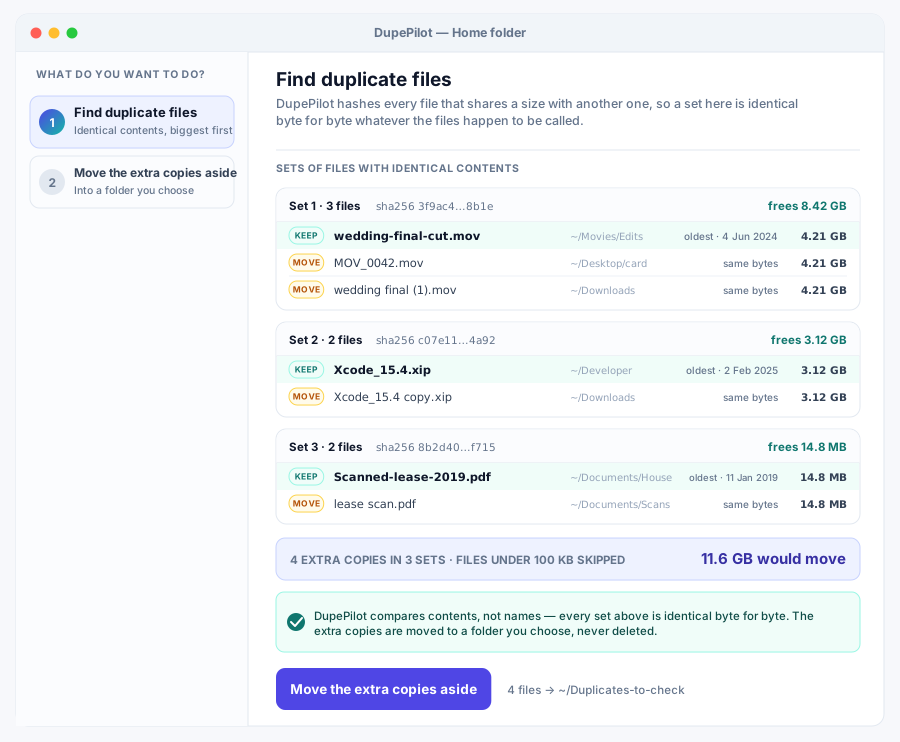
ReadyThe easiest one to start with. Point it at a drive, get back a list of what is duplicated and how much space it is costing you.
 Get DupePilot free →

SnapDocs
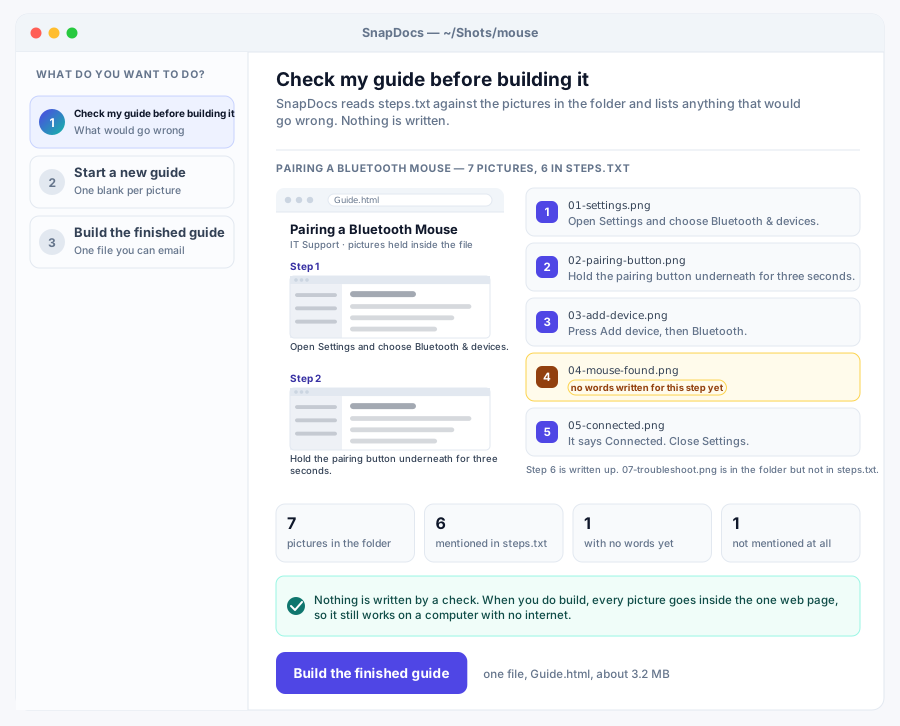
ReadyA folder of screenshots goes in, a guide you can send to someone comes out.
 Get SnapDocs free →

DiskWatch
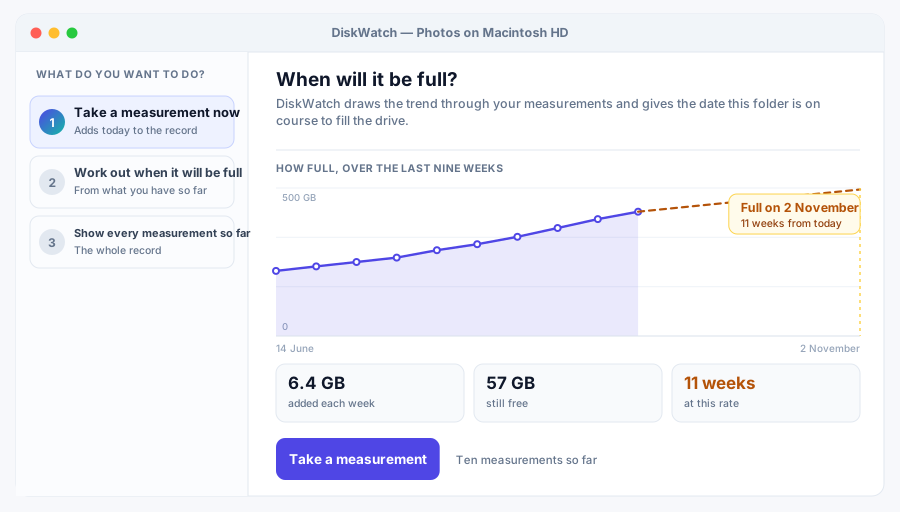
ReadyAnswers the question no other disk tool will: not what is big, but what date you run out.
 Get DiskWatch free →

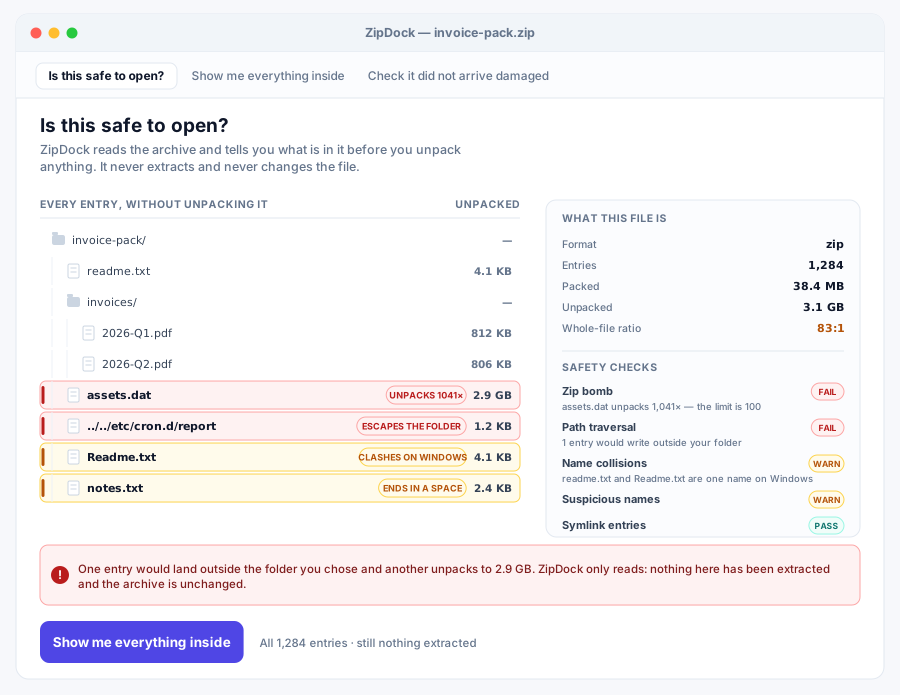
ZipDock
ReadySomebody emailed you a zip. Before you open it, find out what is actually inside.
 Get ZipDock free →

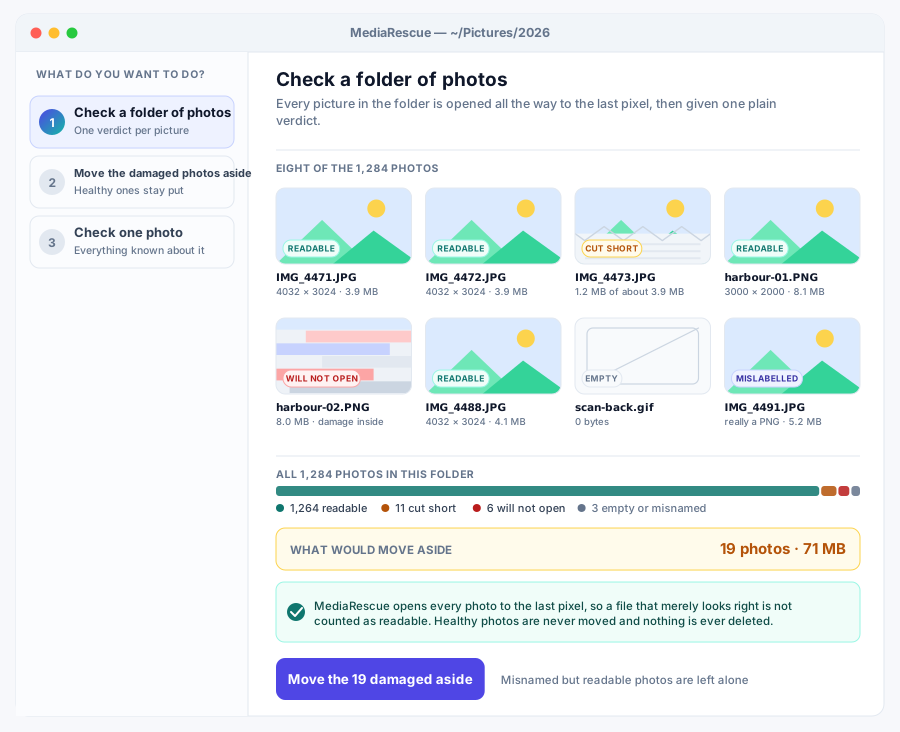
MediaRescue
ReadyOld photo libraries rot quietly. This reads every file and tells you which ones are already damaged.
 Get MediaRescue free →

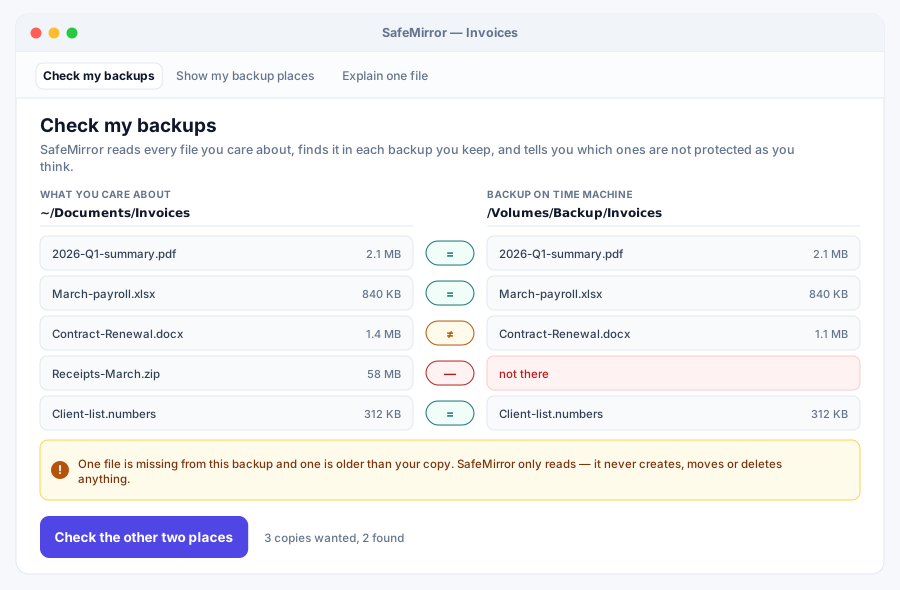
SafeMirror
ReadyYou have backups. This tells you, file by file, whether they would really save you.
 Get SafeMirror free →
The full range
Grouped by the job they do. Each group has four versions, aimed at slightly different people.
Smart Download Manager
● 4/4 liveGetting a file down intact: one big one in pieces, a whole list politely, a standing queue, or a link a teammate asked for.

GrabFlow
Simple ReadyOne big file, several connections, and a resume that won't corrupt it.

DropDeck
Vertical ReadyWork through a whole list of downloads at once, politely, without any site cutting you off.

DownloadPilot
Pro ReadyA download queue that survives being killed. Resuming is just running it again.

FetchForge
Team ReadyOne download queue on one box, and everybody on the team can add to it.
Storage Health Center
● 4/4 liveWhere the room went and when it runs out — a map of a drive, a forecast from measurements, a triage of clutter, a report you can keep.

DrivePulse
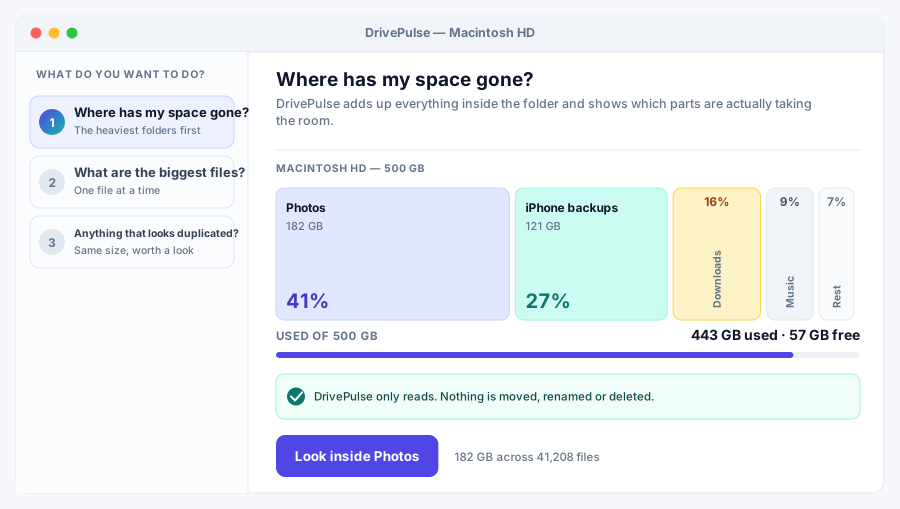
Simple ReadyDouble-click it, pick a folder, see where your disk space actually went.
DiskWatch
Vertical ReadyAt this rate, when does /var/log fill up? A regression gives you the date.

SpaceMedic
Pro ReadySorts what's eating your disk into junk types, and deletes absolutely nothing.

StorageLens
Team ReadyPoint it at six shares and see which one runs out of room first.
Duplicate + Photo Cleanup
● 4/4 liveFiles you have more than one copy of. Byte-for-byte matches, look-alike names, near-identical photos, and whole galleries.
DupePilot
Simple ReadyByte-for-byte duplicates, compared by contents rather than names, and moved rather than deleted.

DuplicateDeck
Vertical ReadyFinds invoice.pdf, invoice (1).pdf and invoice_final.pdf. Never opens a file.

PhotoSweep
Pro ReadyFinds the same photo saved twice at different sizes, which an exact-match tool never will.

CleanGallery
Team ReadyWhich of your shares is wasting the most space on duplicate files?
Screenshot to Documentation
● 4/4 liveA folder of screenshots and a guide somebody can follow. Write it up, check the captions, cover the private bits, mark up the steps.
SnapDocs
Simple ReadyA folder of screenshots plus a text file becomes one guide you can email.

DocSnap
Vertical ReadyTwenty ticket screenshot folders in, twenty step-by-step docs out, one command.

CaptureFlow
Pro ReadyRedact forty support screenshots identically, because the coordinates live in a file.

StepShot
Team ReadyScreenshots plus a manifest become a Word file with the arrows already drawn.
Automation Desk
● 4/4 liveMaking the computer do the repetitive thing. One rule over one folder, many rules at once, or your own commands on a trigger.

MacroDeck
Simple ReadyRun any command automatically when a file shows up in a folder you name.

DeskAutomate
Vertical ReadyDrop a PDF in Inbox and it gets filed. Dry run until you say otherwise.

ActionForge
Pro ReadyMany watch-a-folder rules in one rules file, each failing on its own.

QuickFlow
Team ReadyA folder of workflow files a colleague can run right without reading them first.
Privacy Eraser
● 4/4 liveGetting rid of things properly. Overwriting files for good, clearing the traces programs leave, proving it happened, and auditing a fleet.

PrivacySweep
Simple ReadyOverwrites files with random data, removes them, and records what it destroyed.

CleanVault
Vertical ReadyKnows that Firefox hides your history in places.sqlite. And a hundred places like it.

EraseProof
Pro ReadyShred by policy on a schedule, and keep a ledger that proves it happened.

TraceGuard
Team ReadyChecks every laptop's cache and history trails against a written policy.
Screen Studio Lite
● 4/4 liveWhat to do with a recording you already have: find the good bits, cut the silences, turn it into a picture, and take the secrets out.

CaptureStudio
Simple ReadyTurns a terminal recording into PNGs and tells you which seconds are worth one.

ScreenFlow
Vertical ReadyTurns a recorded terminal session into a GIF you can paste into a ticket.

RecordDeck
Pro ReadyCut a nine-minute terminal recording to ninety seconds without re-recording it.

ClipStudio
Team ReadyFinds credentials in terminal recordings before you share them. Misses one in three.
App Janitor
● 4/4 liveWhat an uninstaller leaves behind. Find the leftovers, compare before and after, clean a fresh machine, and see what has gone stale.

AppJanitor
Simple ReadyFinds the .tmp, .bak and Thumbs.db files quietly piling up in a folder tree.

AppSweep
Vertical ReadySnapshot before you install, snapshot after you uninstall. The difference is the leftovers.

CleanInstall
Pro ReadyCleanup policies saved in a file, plus a ledger of every file ever quarantined.

FreshDesk
Team ReadyWhere is the reclaimable space across all your machines, and which box is worst?
Search Intelligence
● 4/4 liveFinding a file or a phrase on your own machine, with no index to go stale, or with one that narrows as you type.

FindPilot
Simple ReadyFind a file by name or by what's inside it, with no index to build first.

IndexDesk
Vertical ReadyIndex a tree once, then ask which of the hits are .go files under 100 KB.

SearchForge
Pro ReadyIndex your files once, then get results back with no disk scan at all.

LocalLens
Team ReadySearch every teammate's index at once and find out who else has the same file.
Archive Vault
● 4/4 liveArchives, and knowing what is in one before you open it. Look inside safely, lock one with a password, split a big one, put a folder into storage.

VaultZip
Simple ReadyTurns a folder into one password-locked file, with a fingerprint for every file inside.
ZipDock
Vertical ReadyLook inside an archive someone sent you before you unpack it.

ArchiveGuard
Pro ReadyShreds your originals only after proving the encrypted copy reads back byte for byte.

PackSafe
Team ReadySplit a big archive into volumes, then prove later which piece went bad.
Verified Copy & Sync
● 4/4 liveCopying that proves it arrived. Read the copy back, move between drives, empty a card safely, and keep the proof.

CopySure
Simple ReadyCopies a tree, then re-reads every file off the disk and checks it byte for byte.

TransferForge
Vertical ReadyOffload a card, then hand the client a manifest proving every file arrived.

MoveGuard
Pro ReadyMoves files, then proves the copy landed intact before it deletes the original.

SyncProof
Team ReadyCopies one build to three shares at once and says which share came out bad.
File Command Center
● 4/4 liveBulk changes to a lot of files at once — names, places, sorting rules, or a whole plan written out in a spreadsheet.

FilePilot
Simple ReadyRenumber a photo dump, or rename a whole folder by pattern. It shows you the plan first.

FileOps
Vertical ReadyRename in place with a real template language, and an undo that puts it all back.

FolderForge
Pro ReadyWrite the sorting rules once. Re-run it whenever Downloads gets messy again.

FileDeck
Team ReadyA spreadsheet says what happens to each file. FileDeck does all of it, or none.
Remote Ops Workspace
● 4/4 liveMachines you cannot walk over to. Watch whether they answer, record and replay a session, read your SSH config, and share one agreed hop.

RemoteDeck
Simple ReadyA watchlist of hosts that stays quiet until something actually changes state.

SessionForge
Vertical ReadyRecords a command's output with exact timings and replays it at real speed.

SSHDesk
Pro ReadyShows what ssh will actually do with your config, and why.

OpsTunnel
Team ReadyOne agreed TCP hop for the team, with a record of who used it and for how long.
Driver Safety Center
● 4/4 liveDrivers and the state a machine was in before you touched them: a saved copy, a version list, a sealed record, and a way back.

DriverGuard
Simple ReadyCopy a folder's exact bytes now, so you can put one file back later.

DriverPilot
Vertical ReadyInventory a driver folder before and after an update, then diff the two.

DeviceDriver
Pro ReadySeal a driver folder's fingerprints, then prove months later that not one byte changed.

DriverRollback
Team ReadySnapshot a driver tree, then get the exact bytes back. Dry run unless you insist.
Desktop Workspace Manager
● 4/4 liveWhere things sit on your screens. Saved sets of what to open, window layouts that survive a new monitor, and shortcuts that stop clashing.

DeskPilot
Simple ReadySave your morning set of tabs, apps and folders under one name. Open it in one command.

DeskScene
Vertical ReadyYour 12-pane trading layout won't fit the hotel laptop. This says what to give up, and why.

WorkspaceForge
Pro ReadyWorks out where every window goes when today's screen isn't yesterday's.

WindowDeck
Team ReadySettles whose Ctrl+Shift+P it is across everyone's keybinding files.
Hardware Health Hub
● 4/4 liveWhat this machine is and how it is holding up — a plain report, a sustained-load test, folders being watched, and a fleet at a glance.

HardwareLens
Simple ReadyOne page describing this computer, honest about everything it cannot see.

SensorDeck
Vertical ReadyLoads your machine for five minutes and shows whether it holds its speed.

DevicePulse
Pro ReadyLogs folder sizes on a schedule and shouts when one jumps more than 25% since last time.

PCHealth
Team ReadyForty workstations, one sorted table, and the odd one out flagged for you.
Sync Reliability Suite
● 4/4 liveTwo folders that are supposed to match. See what would change, keep a record of every run, work both directions, and never lose the old version.

SyncGuard
Simple ReadyMirrors one folder onto another, and shows the plan before touching anything.

SyncLedger
Vertical ReadyPush a folder to the machine across the room, over your own HTTP server.

MirrorFlow
Pro ReadyTwo-way folder sync that can tell your edit apart from the other side's.

FolderSync
Team ReadyOne-way sync that keeps the old copy of every file it overwrote.
ISO + Boot Workshop
● 4/4 liveDisc images and startup sticks. Fingerprint one, catalogue a library, look inside without mounting, and check an image against a stick.

BootForge
Simple ReadyFingerprint every file in a tree now, prove later that not one byte moved.

RescueUSB
Vertical ReadyCheck an ISO will boot your machine before you spend 20 minutes writing it.

ISOPilot
Pro ReadyOpen an ISO and pull one file out of it. No mounting, no root, no libraries.

ImageDeck
Team ReadyCatalogue a shared folder of ISOs and find out which ones are the same file.
Phone Bridge
● 4/4 liveThe gap between a phone and a desk. Send one thing across the Wi-Fi, keep two libraries in step, empty a camera roll, or move to a new handset.

PhoneBridge
Simple ReadySend a file to your phone by opening a web address. No cable, no app, no account.

PocketSync
Vertical ReadyBoth phones got used since they last matched. This works out what belongs where.

DeviceDock
Pro ReadyFiles phone photos by the date the shutter fired, not the date you copied them.

MovePhone
Team ReadyMove a phone's files onto the new handset and prove every byte arrived.
Network Control Center
● 4/4 liveWhy the network feels slow. Which doors are open, which links keep dropping, what is using the connection, and which office is the problem.

NetLens
Simple ReadyPort scanning and latency checks for one host, with no admin rights needed.

LinkGuard
Vertical ReadyProbe the link every 30 seconds for a month, then write four lines about it.

TrafficPilot
Pro ReadyA local proxy that counts, per site, exactly how many bytes crossed the wire.

RouteWatch
Team ReadySix offices, ten targets, one grid that names whose network is at fault.
PC Performance Console
● 4/4 liveHow fast this machine really is, and whether it stays that way — one core, the whole machine, a score you can compare, and a soak test.

CorePilot
Simple ReadyHow much faster is your machine with every core than with one?

SystemPulse
Vertical ReadyTimes one command thirty times over and tells you when it gets slower.

PerformanceDeck
Pro ReadyOne benchmark score, plus the breakdown showing which part of the machine moved.

ThermalFlow
Team ReadyBenchmarks on a schedule and flags the day your machine got slower.
Backup + Rescue
● 4/4 liveBackups you can actually rely on. Check the copies exist, keep snapshots, prune them by rule, and spot the job that quietly stopped running.

RescueVault
Simple ReadyTimestamped snapshots you can browse, where unchanged files cost no extra disk.
SafeMirror
Vertical ReadyAudits the backups you already have against the 3-2-1 rule, one file at a time.

RestoreGuard
Pro ReadyKeeps yesterday's snapshots by the hour and last month's by the week.

BackupMedic
Team ReadyWhich backup jobs quietly stopped working, and how long ago they last succeeded.
Windows Deploy Kit
● 4/4 liveSetting up machines the same way twice. A written recipe, an answer file, a dependency-aware run, and a stick image built from a folder.

DeployForge
Simple ReadyCheck, then install, then skip it next time. A recipe file that's safe to re-run.

SetupPilot
Vertical ReadyCatches the unattend.xml typo that silently images 200 machines wrong.

WinImageKit
Pro ReadyRuns deployment steps in dependency order and won't start on a broken graph.

BootBuilder
Team ReadyHand-writes a FAT32 image, then reads it back with code that shares nothing with the writer.
Media Rescue Lab
● 4/4 livePhotos and video that have gone wrong. Find the damaged ones, carve files off a card, mend what can be mended, and diagnose what cannot.
MediaRescue
Simple ReadyDecode every photo in a folder and learn which ones are actually still good.

CardRecovery
Vertical ReadyCarves photos out of a card image whose filesystem is already gone.

PhotoRevive
Pro ReadyScan years of photo folders in one run, and rescue JPEGs that lost their tail.

VideoMend
Team ReadyExplains why a video won't play, without a single line of codec code.
Disk Operations Suite
● 4/4 liveThe disk itself: how fast it reads and writes, whether its partition table agrees with itself, and where the surface is struggling.

DiskOps
Simple ReadyWrites 256 MB, fsyncs it, reads it back. Two numbers in MB/s.

PartitionGuard
Vertical ReadyReads a disk image's partition table and checks whether it contradicts itself.

DriveForge
Pro ReadyBenchmark several drives against each other, same settings for every one.

SectorPilot
Team ReadyTimes every block of a disk image and maps which ones are struggling.
No tools match "". Try a different search.
Not sure which one you need?
31 plain guides to the jobs themselves — what is actually going on, what your computer can already do about it, and where one of these helps.
How to find duplicate files on Windows and Mac
Three different things get called a duplicate file, and a tool that finds one kind is blind to the other two. Here is how to tell which you have.
Read it →What is filling up my hard drive?
Finding the folder that grew, knowing what kind of thing grew, and knowing when the drive actually runs out are three different questions.
Read it →How to check whether your backup would actually restore
A backup that runs every night and a backup that would get your files back are not the same thing, and the gap between them is where people lose data.
Read it →Why won't this video play?
A video that will not open has usually failed for one of four reasons, and the file itself will tell you which.
Read it →How to recover photos from a memory card
The first thing to do is stop using the card. The second is to copy it into a file, and work on the copy.
Read it →How to securely delete files (and when not to bother)
Overwriting a file works on a hard disk and is close to meaningless on an SSD. Which one you have decides the whole answer.
Read it →Techlosoft Suite
One wizard manages all 100
Install the programs you want, take off the ones you don’t, and see at a glance what has a newer build. It moves removed programs to a trash folder instead of deleting them, and checks every file against its hash before it lands. Included with every plan.
Later on, one plan gets you all 100
No per-program checkout, no cut-down edition, no upsell inside the app. Every plan is the whole range on Windows and Mac — and right now, in preview, it costs nothing at all.
30-day refund, no questions asked. Nothing to pay while we’re in preview.
How we choose what to build
Every program here starts from software people already pay for. We look for where several paid tools overlap in the job they do, then design one program that does that whole job well.
1. Find the overlap
We start from the paid programs people already buy — 78 of them so far — and group them by the job people hire them for. Each program page names the four behind it.
2. Combine the best parts
Each program takes the strongest ideas from four paid tools and makes them work together, instead of doing a thin version of all four.
3. Ship something focused
Every program has a published build plan: what ships first, how it is made, and where the pricing sits.
Names on this site are working titles. Several will change before release — each program page notes where its name stands.